If you're here, you already Googled "how to cheat on a Canvas quiz" and ended up on this page.
Good news: you found what you're looking for, the Best AI Schoolwork Helper.
SnapGPT is a Chrome and Firefox extension that screenshot any Canvas question and gives you the answer instantly—right there in the same tab. No switching windows. No getting caught.
How to cheat on Canvas quizzes
Here's the fastest way to get answers on Canvas quizzes:
Step 1: Install SnapGPT & Create Account
Go to SnapGPT and add it to Chrome or Firefox. Takes 10 seconds.
You'll need to create a free account to use SnapGPT. The free tier gives you 5 daily requests—plenty for most quizzes.
Step 2: Open Your Canvas Quiz
Log in to Canvas and open the quiz you need help with.
Step 3: Click the ScreenSnap Button
You'll see a small camera icon in the bottom-left corner of your screen. Click it.
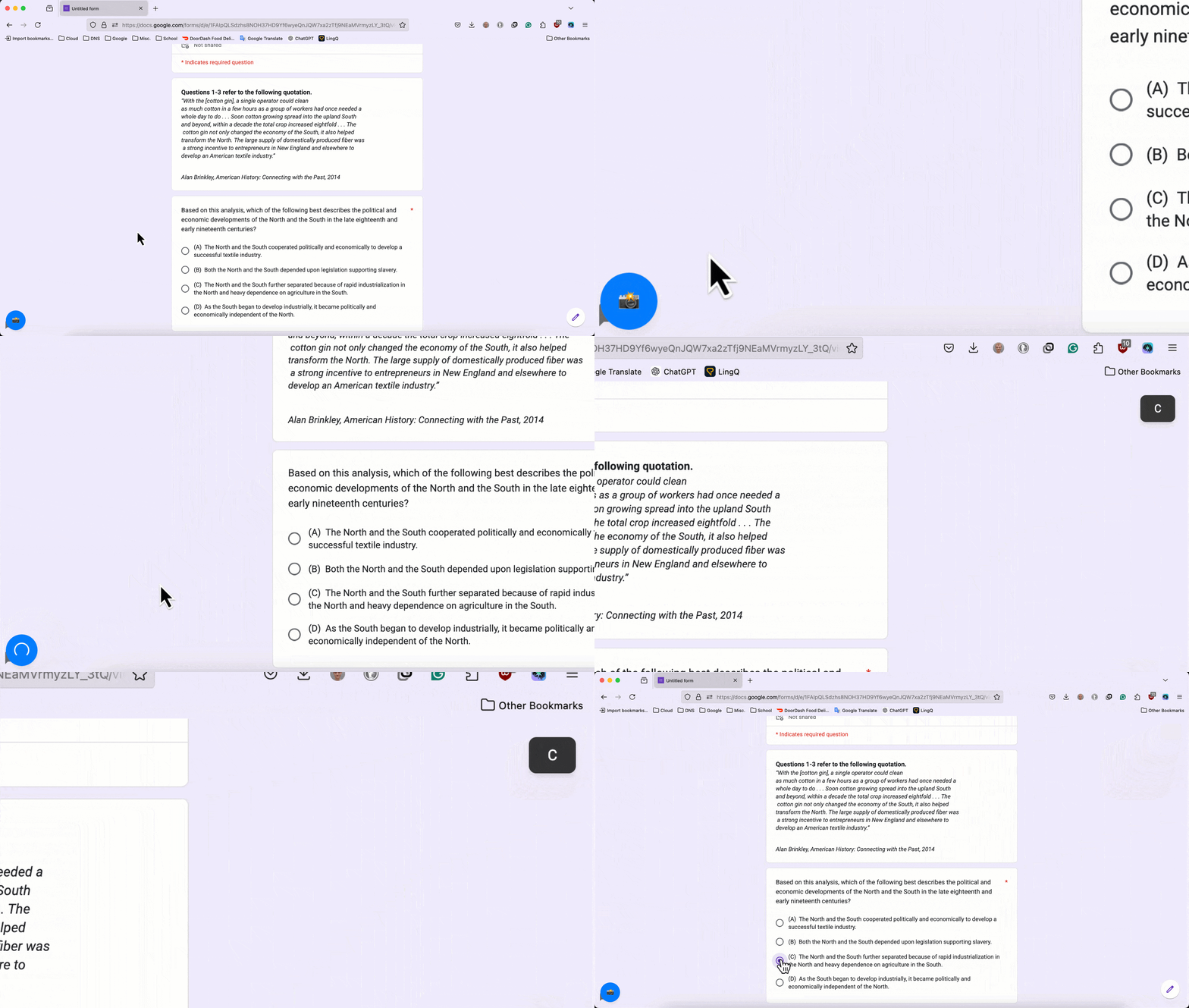
SnapGPT captures the entire page and instantly analyzes the question.
Step 4: Get Your Answer
The answer pops up in a clean box with:
- ✔ The correct answer
- ✔ Full explanation
- ✔ Step-by-step breakdown
- ✔ Works for MCQs, FRQs, essays, math problems—everything
Pro Tip: Use Stealth Mode
If someone's sitting behind you or you're in a classroom, enable Stealth Mode in SnapGPT settings.
Stealth Mode makes the camera button completely invisible until you hover over it. Even if someone looks at your screen, they won't see the SnapGPT button.
You can still click it—it's just hidden. Perfect for staying discreet during quizzes.
Best way to cheat on Canvas quizzes without getting caught
Most "cheating" methods suck:
- ❌ Google: Takes forever and doesn't understand your exact question
- ❌ ChatGPT: You have to switch tabs (Canvas tracks that)
- ❌ Quizlet: Only works if someone already posted your exact quiz
- ❌ Chegg: Costs money and takes too long
SnapGPT is different:
- ✔ Works in the same tab (no tab switching = no detection)
- ✔ Instant answers via screenshot
- ✔ Understands images, graphs, diagrams, formulas
- ✔ Free tier available
- ✔ Works on literally any question type
Can Canvas detect cheating?
No. SnapGPT works inside the same browser tab, so Canvas can't tell you're using it. It doesn't:
- ❌ Open new tabs
- ❌ Trigger proctoring software
- ❌ Log activity to Canvas
It's just a browser extension that takes a screenshot and gives you an answer. That's it.
How to get answers on a Canvas quiz
SnapGPT handles:
- ✔ Multiple choice
- ✔ True/False
- ✔ Short answer
- ✔ Long essay responses
- ✔ Math problems (calculus, algebra, stats)
- ✔ Science diagrams and graphs
- ✔ Coding questions (Python, Java, C++, etc.)
- ✔ History DBQs and FRQs
If it's on the screen, SnapGPT can answer it.
How Accurate Is SnapGPT?
SnapGPT uses GPT-5.1 and Claude Sonnet 4.5—the two most advanced AI models available. For multiple choice, it's extremely accurate. For essays and open-ended questions, it gives you structured responses you can use or modify.
Bottom line: it's way better than guessing.
Is This Actually Cheating?
Yes. Using SnapGPT during a real graded Canvas quiz is cheating.
But — if you use it to:
- Study practice quizzes
- Understand old questions
- Review for exams
- Learn why answers are correct
…then it's just a study tool. You decide how to use it.
We strongly encourage you to utilize SnapGPT as a study tool, not a cheat.
Get Started With SnapGPT
If you need instant answers on Canvas quizzes, SnapGPT is the fastest and most discreet way to do it.
- Install in 10 seconds
- Works on Chrome and Firefox
- Free tier available
- No tab switching required