How to Install SnapGPT (60 Seconds)
Getting started is dead simple:
- Go to the Chrome Web Store and search for SnapGPT, or click here to install directly.
- Click Add to Chrome and confirm.
- Click the puzzle piece icon in your browser toolbar and pin SnapGPT so it's always visible.
- Click the SnapGPT icon → Sign Up → enter your email and password.
- Verify your email (check your inbox or spam folder), then sign in.
That's it. You're ready to get AI question answers on any page.
Firefox user? SnapGPT supports Firefox too — install it here.
How to Get AI Question Answers — 3 Ways
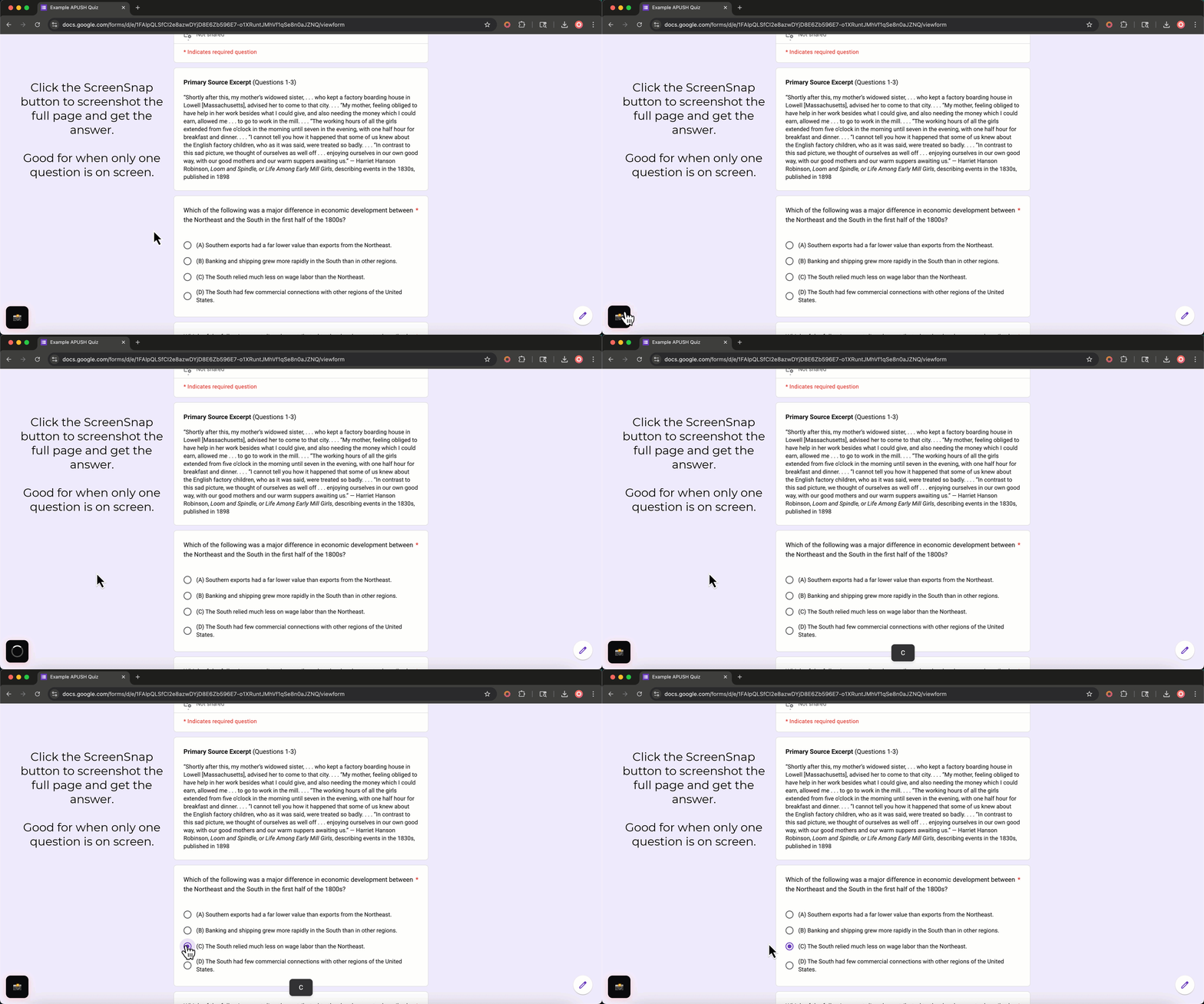
Once installed, there are three simple ways to get answers:
1. 📸 Click the Floating Button
A small camera button lives in the bottom-left corner of every page. Click it to take a full-page screenshot. SnapGPT analyzes the screen and returns:
- A letter (e.g., B) for multiple-choice questions
- A full written response for free-response or essay questions
The answer appears in a small popup at the bottom of your screen and disappears after a few seconds — clean and unobtrusive.
2. ⌨️ Use the Keyboard Shortcut
Don't want to click anything visible? Press Alt+Shift+X (Windows/Linux) or Option+Shift+X (Mac) to trigger a screenshot instantly — no button click required. This is the most discreet method.
3. 🖱️ Right-Click Selected Text
If the question is plain text on the page, just highlight it, right-click, and choose "Analyze with SnapGPT." You'll get the same AI-powered answer without even taking a screenshot.
Discreet Mode: Stay Under the Radar
SnapGPT is designed to be as invisible as you need it to be. Here's how to make it completely discreet:
Enable Subtle Mode
- Click the SnapGPT icon → go to the Appearance tab in settings.
- Toggle on Subtle Mode.
This minimizes the floating button so it's barely visible on screen.
Make the Button Invisible
With Subtle Mode on, enable Transparent Button. The floating button becomes completely invisible — zero opacity. It still works; you just can't see it. Use the keyboard shortcut Alt+Shift+X to trigger it without ever touching the button.
Show Answers in the URL Bar
Also under Subtle Mode, enable Answer in URL Bar. Instead of a popup, your answer appears briefly in the browser's address bar — like https://yourpage.com#ans:B — and then disappears automatically. It's the most discreet way to receive AI question answers without anything appearing on the main page.
For a full breakdown of how to use these discreet features on a live quiz, see our guide on how to use SnapGPT on any quiz in under 2 minutes.
Advanced: Multi-Screenshot for Long Questions
Some questions don't fit on one screen. SnapGPT handles this with Multi-Screenshot Mode:
- Hold Alt (Windows) or Option (Mac) and click the button to capture the first part of the question.
- Scroll down, then Alt/Option+Click again to capture more.
- Repeat up to 3 screenshots.
- Click the button normally to send all screenshots to the AI at once.
The AI reads all three images together and gives you one unified answer. Perfect for long reading comprehension questions or multi-part problems.
What About the AI Chat?
SnapGPT also includes a full AI chatbot here. Use it for:
- Homework help and essay writing
- Math problem solving
- Explaining concepts in plain English
- Uploading images for analysis
- Web search for current information
You can choose between GPT-5.4, or SnapGPT 1.0 Uncensored — a completely unrestricted model with no content filters. Learn more about the chat in our post on Introducing SnapGPT Chat: Three Powerful AI Models, One Subscription. You can also ask additional questions here about the product if you need help.
Plans & Pricing
| Plan | Price | AI Question Answers | Chat Messages |
|---|---|---|---|
| Free | $0/forever | 5/day | 5/day |
| Plus (Weekly) | $3.99/week | Unlimited | Unlimited |
| Plus (Monthly) | $9.99/month | Unlimited | Unlimited |
| Plus (Annual) | $7.49/month | Unlimited | Unlimited |
The free plan is genuinely useful for light use. If you're using SnapGPT daily for quizzes and homework, Plus pays for itself fast.
Why SnapGPT Is the Best Way to Get AI Question Answers
There are a lot of AI tools out there, but most of them require you to:
- Open a new tab
- Copy and paste the question
- Wait for a response
- Switch back to your quiz
SnapGPT eliminates every one of those steps. You stay on the page, you press one button (or a keyboard shortcut), and the answer appears — in under 3 seconds. No tab switching. No copy-pasting. No one noticing.
If you've been manually hunting for answer keys or bouncing between tabs, you already know how slow and risky that is. SnapGPT replaces all of that with one clean, fast, discreet tool. For more on why this matters, read our post on finding answer keys the smarter way.
Get Started Now
Install SnapGPT for free in under 60 seconds and get your first AI question answers today:
👉 Install SnapGPT from the Chrome Web Store
No credit card required. Free plan available forever. Works on Chrome and Firefox.